What is TricePorter?
TricePorter is a versatile file transfer automation tool featuring a flexible scheduling system and support for SFTP and S3 protocols. It can run as a portable binary on the most popular operating systems, handling all these tedious tasks for you—including compressing files on the fly and storing them in daily directories. It was developed to reduce overhead which is coming to the picture when some automated transfer flows need to be established.
In other words, it’s very useful when you need to pull/push/archive files based on some predefined schedule or constantly in real time. You no longer need to repeat annoying manual steps again and again which is great!
Automation here is first priority and all other bells and whistles are secondary, so do not be surprised to not find them in our app. We are considering expanding the scope based on feedback from the community, so some functions which you personally classify as important might be included into further versions of TricePorter. We’ll be happy to see your feedback on our Linkedin page.
We believe that it is very important to have our tool to be cross-platform and available on major operational systems. So, we are trying to keep scope clean with only reasonably useful features, otherwise maintaining distributives for different platforms might turn into a nightmare.
High level overview
Please review the diagram below which can give an idea on how TricePorter is working. This is example of random setup with SFTP and S3 destinations.
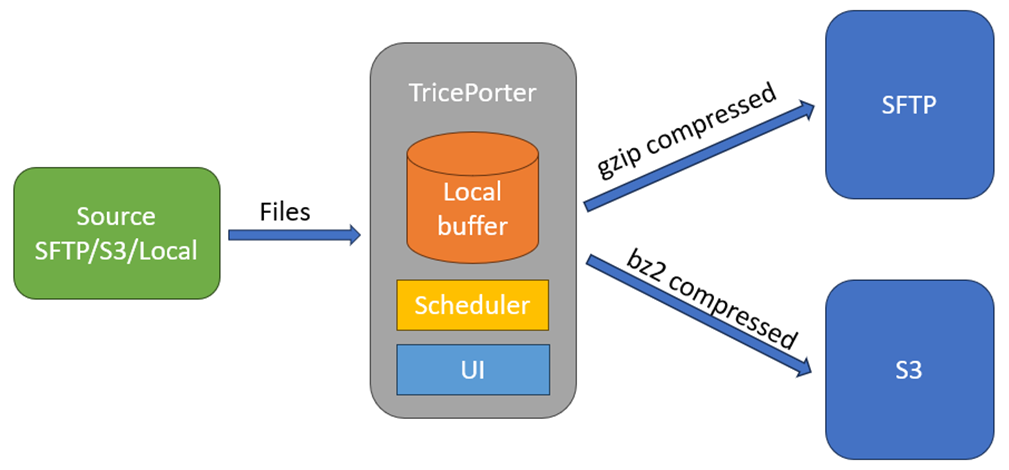
Files are coming from the source and could be distributed into multiple different locations. You can do it manually or you can use scheduling option, compress/uncompress files on the fly, put them into daily directories, etc.
The most important thing to remember that files are being transferred in two steps:
Step 1
Files are coming to the local buffer first. Local buffer is located in the same directory as a TricePorter binary ./appdata/buffer/<Name_of_destination>.
Step 2
Then files from the local buffer are being transferred into destinations. Buffer will be cleared when the file will be successfully transferred.
If you have the flag “Delete file after collection” set in “Yes”, then the file will be deleted from the source once it will be successfully downloaded into the local buffer. If you will have some issues with distribution (for example, SFTP credentials will not work properly) then your file will be safely stored in the buffer until the issue will be resolved. If it will not be resolved soon and you need your file, then you can pull it from the buffer manually.
Read the full TricePorter documentation.
Continue with installation, downloads, configuration, UI review, and detailed SFTP/S3 settings.
View full documentation